
Marketplace
Plugins
A plugin is a single script file that extends DMXexpress: paint a new effect layer, add your own window of controls, or restyle the whole console. Download one below, drop it on the app's Plugins window, and it is live — no restart, no compiler.
Download
Grab a .rhai file from the registry below — or from any GitHub link someone shares on the forum.
Drop it in
In DMXexpress, open Plugins from the toolbar and drag the file onto the window — or press Open folder and copy it there, then Reload all.
Enable it
Tick the plugin in the list. Layers start mixing immediately, windows appear under its Window toggle, and looks restyle the console. Untick or Remove any time.
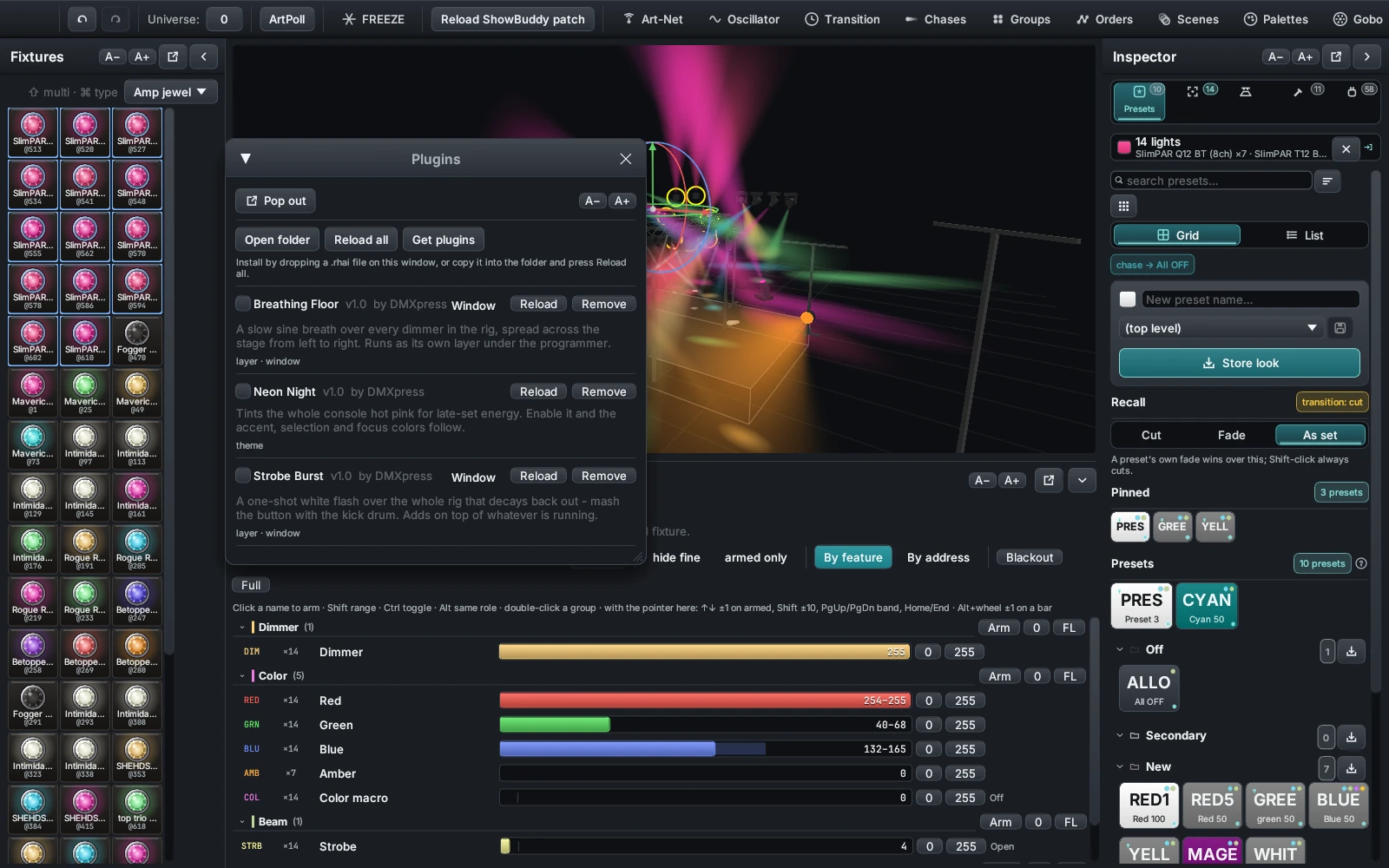
The window, control by control
| Control | What it does |
|---|---|
| Tick box | Enables the plugin. Its layer starts mixing, its theme applies, its window becomes available. The name beside it comes from the script's name: header. |
| Window | Shows the plugin's own control window. Only appears when the script declares controls. |
| Reload | Recompiles that one script from disk. Edit, save, reload — the enabled state and your slider positions survive. |
| Remove | Deletes the script file, after a Delete file confirmation you have to press. |
| Open folder | Reveals the plugins folder in your file manager. |
| Reload all | Re-scans the folder and recompiles every script. This is how new files get noticed. |
| Get plugins | Opens this page in your browser. |
What each row tells you
Under the name, the window prints a small tag line for what the script actually contains — some plugins are all three, most are one:
- layer — the script defines
frame(), so it paints DMX - window — it declares controls, so it has a panel of its own
- theme — it returns a theme tint, so it recolours the console
Anything that went wrong is printed in red on the row itself. A script that will not compile still lists here with its headers intact, so you can see which file needs the fix.
Where the files live
Scripts sit in a plugins folder beside your show files, and which
ones are ticked is remembered in plugins.json next to it. Plugins load
in file-name order, which is also the order their layers stack.
Plugins are sandboxed, but read them anyway
Scripts run inside the app's sandbox: no file, network, or system access, and a runaway loop is stopped by an operation budget. Still, a plugin does drive your rig's DMX output — skim any script before running it in front of an audience.
Three kinds
What a plugin can be.
The registry sorts plugins by what they do to the console. A script is free to do all three at once, but the useful ones usually pick a lane.
Effect
Defines frame(t, rig, state) and returns address/value pairs every
tick. The app paints them onto a mixer layer of the plugin's own, using the blend
its header asked for.
Bundled example: Breathing Floor, Strobe Burst.
Tool
Declares controls() — sliders, tick boxes, buttons and labels — and
gets a floating window built for it. The values land in the state map
the script reads back.
Both bundled effects put up a window.
Look
Returns a theme() map of hex colours. While it is enabled, the
accent, surface and text colours of the whole console follow it — no layer, no
window, just a re-tint.
Bundled example: Neon Night.
Registry
Browse plugins.
Community plugins are reviewed before they appear here. The three starters ship inside DMXexpress — download them here anyway if you deleted yours.
Every download is a plain text file. Open it in any editor before you install it — that is the whole point of shipping scripts instead of binaries.
Share yours
Submit a plugin.
Host the .rhai file anywhere public — a GitHub repository or release
works perfectly — then submit the direct link. Submissions are held for review
before they appear in the registry.
Before you press submit
- Sign in with Google, and pick a username on the community page first — the registry credits that name as the author
- The slug is the plugin's permanent id: lowercase letters, digits and hyphens, starting with a letter or digit
- The download link must point straight at the
.rhaifile, not at a page about it - Keep the description under 500 characters and say what it does on stage
- Ship the same headers inside the file — the app reads its own name, version and author from the script, not from this form
What happens next
A submission is stored unapproved and does not show in the registry until it is reviewed. Nothing you submit is executed by this website; the file stays wherever you host it and the registry only ever hands out the link.
Push a fix to the same URL and everyone who downloads after that gets it. Bump
the version: header in the file so people can see which one they have
in the Plugins window.
No account yet?
Post the GitHub link on the forum instead. Plenty of plugins start life as a paste in a thread.
For developers
Write a plugin in an afternoon.
Plugins are Rhai scripts — one file, four optional functions, headers at the top. If you can write a for-loop, you can write a light show.
The smallest plugin that works
This is neon_night.rhai, shipped with the app, in full. No layer, no
window — twelve lines that recolour the console.
//! name: Neon Night
//! version: 1.0
//! author: DMXpress
//! description: Tints the whole console hot pink for late-set energy.

// A theme-only plugin: no layer, no window - just a look.
fn theme() {
    #{
        accent: "#E23A8E",
        text: "#F6EFF4",
    }
}
The shape of a plugin
Headers first, then any of the four functions. Everything is optional — a file with
only theme() is a plugin, and so is one with only frame().
//! name: My Plugin
//! version: 1.0
//! author: you
//! description: One line, shown under the name in the Plugins window.
//! blend: highest          // mix (default) | highest | add

// The window. Runs once when the file loads or reloads.
fn controls() {
    [
        #{ kind: "slider",   id: "rate", label: "Rate", min: 0.1, max: 4.0, value: 1.0 },
        #{ kind: "checkbox", id: "fan",  label: "Fan across the stage", value: true },
        #{ kind: "button",   id: "kick", label: "KICK" },
        #{ kind: "label",    text: "A line of help text." },
    ]
}

// The layer. Called about 40 times a second while the plugin is ticked.
// Return [address, value] pairs: 1-based DMX addresses, values 0..255.
fn frame(t, rig, state) {
    let out = [];
    for f in rig {
        if f.dimmer > 0 {
            let v = (1.0 + sin(t * state.rate + f.x)) / 2.0;
            out.push([f.dimmer, (v * 255.0).to_int()]);
        }
    }
    out
}

// A window button was pressed. Return the new state map to keep changes.
fn button(id, t, state) {
    if id == "kick" { state.kicked_at = t; }
    state
}

// The look. Any subset of accent, surface and text, as #RRGGBB.
fn theme() {
    #{ accent: "#E23A8E" }
}
The headers
| Key | Meaning |
|---|---|
name | Shown in the Plugins window. Defaults to the file name with underscores turned into spaces. |
version | Free text beside the name. Defaults to 0.1. |
author | Shown beside the version when present. |
description | One line under the name in the list. |
blend | How the layer folds into the mix: mix (default), highest (or max), add. |
Headers are //! lines and must come before the first line of code —
parsing stops there. Keys the app does not know are ignored, so a newer header
never breaks an older build.
The four hooks
| Function | What it does |
|---|---|
controls() | Declares the plugin's window: sliders, tick boxes, buttons, labels. Runs once at load and at Reload, enabled or not. Values live in state, keyed by control id. |
frame(t, rig, state) | Called every tick while enabled. Returns [address, value] pairs painted onto the plugin's own mixer layer. |
button(id, t, state) | Runs when a window button is pressed. Return the state map to keep what you changed. |
theme() | Returns any subset of accent, surface and text as #RRGGBB. Also runs at load, and re-tints the console while enabled. |
state is read-only inside frame()
Your frame() gets a copy. Anything you assign to state
there is thrown away when the call returns. button() is the only hook
whose returned state is kept — that is why the strobe below stores its trigger
time in button() and only reads it in frame().
The controls you can declare
| kind | Fields | What lands in state |
|---|---|---|
"slider" | id, label, min, max, value | A float under id. value is the starting position — default is a reserved word in Rhai, which is why it is spelled value. Omit it and the slider starts at min. |
"checkbox" | id, label, value | A bool under id, starting false unless value: true. |
"button" | id, label | Nothing. Pressing it calls button(id, t, state). |
"label" | text | Nothing — a line of dimmed help text in the window. |
Leave label out and the id is used instead. Leave id out and
one is generated, which is fine for labels and useless for anything you want to read.
Each rig entry
The rig argument is an array of maps, one per patched fixture, in
patch order. It is rebuilt every frame from the live patch and the stage layout, so
repatching or moving a light shows up on the next tick.
| Field | Meaning |
|---|---|
i, name | Fixture index and display name |
addr, channels | 1-based base address and channel count |
dimmer red green blue white | Absolute address of the first channel with that role, 0 if the fixture has none |
x y z | Stage position in metres — fan effects across space |
Always guard on zero. A moving head with no white channel reports
white: 0, and address 0 does not exist — writes to it are dropped.
Anything the rig map does not name, like pan, tilt or a gobo wheel, you reach by
arithmetic on addr.
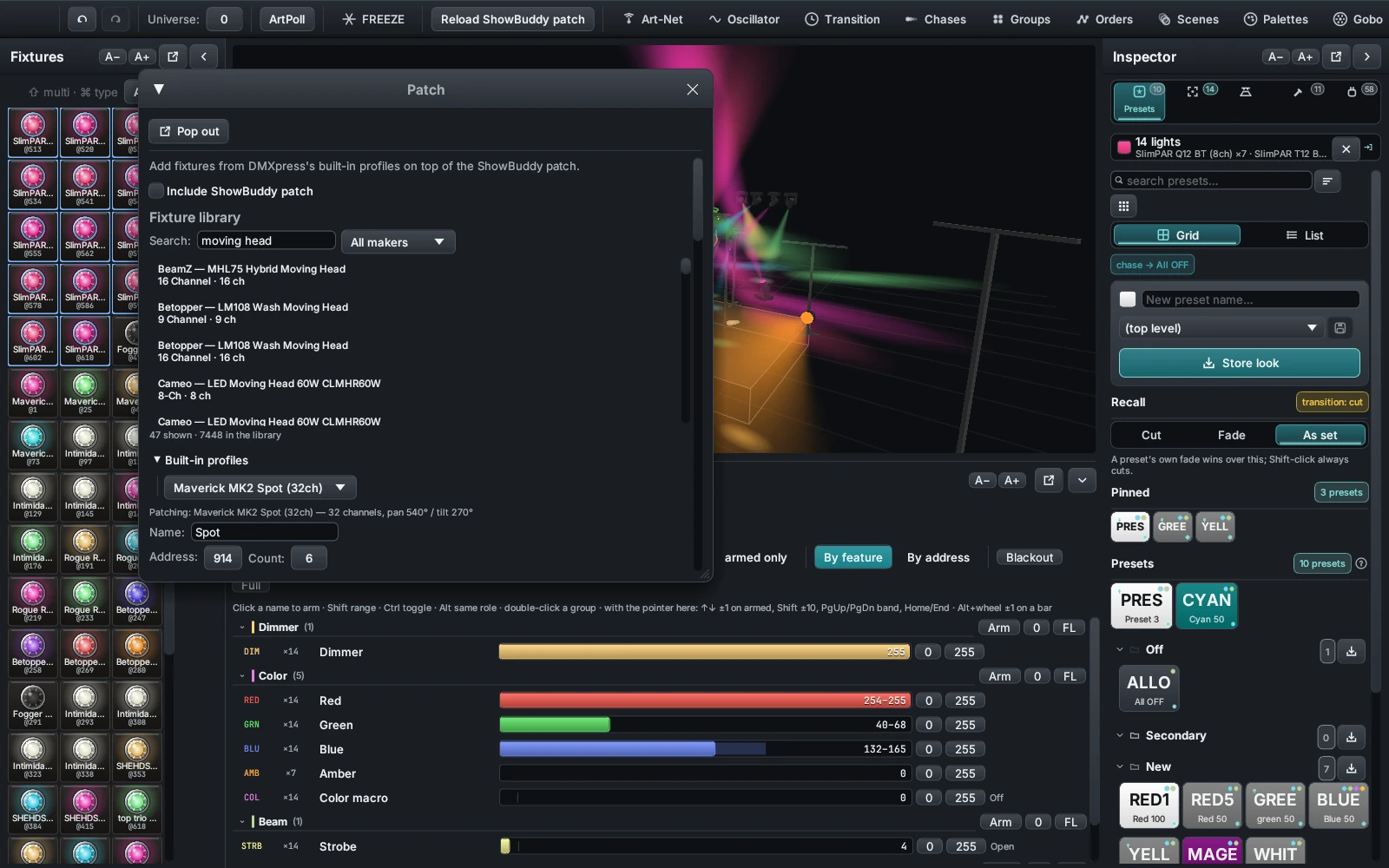
The patch is where addr, channels and the role addresses come from. Patch a light and it appears in rig on the next frame.
What the sandbox gives you
hsv(h, s, v)takes three 0..1 floats and returns[r, g, b]as 0..255 integers — hue wraps, so1.2is the same as0.2print("...")lands in the app's Log window, prefixedPlugin:- Rhai's own library:
sin,cos,sqrt,abs,to_int,len(),push, maps, arrays,in - Addresses run
1to1024— two universes of 512, so 513 is channel 1 of the second - Values are clamped to 0..255 for you, and out-of-range addresses are dropped rather than erroring
Rules of the sandbox
- No file, network, or process access — scripts only compute values
- Every call gets a budget of 250,000 operations, so an accidental
while trueaborts with an error instead of hanging the desk - An array can hold 8,192 entries and a map 1,024 keys — comfortably more than one pair per channel, but not unlimited
- Strings cap at 16,384 characters and calls nest 24 deep
- A
frame()that errors has that hook parked until you press Reload — it will not spam and it will not stall the frame rate
Worked examples
The three that ship with the app.
These are the real files, in full, from the plugins folder of the
repository. Download them from the registry above, open them side by side with
this page, and change one number at a time.
Breathing Floor — a layer that reads the stage
A sine breath over every dimmer in the rig, phase-offset by where each light stands.
It is the shortest path to something that looks deliberate rather than random: use
the x the stage already knows.
//! name: Breathing Floor
//! version: 1.0
//! author: DMXpress
//! description: A slow sine breath over every dimmer in the rig, spread across the stage.
//! blend: highest

fn controls() {
    [
        #{ kind: "label",    id: "hint",  text: "Breathes every dimmer, fanned across the stage." },
        #{ kind: "slider",   id: "rate",  label: "Rate (cycles/min)", min: 2.0,  max: 60.0, value: 12.0 },
        #{ kind: "slider",   id: "depth", label: "Depth",             min: 0.0,  max: 1.0,  value: 0.6 },
        #{ kind: "slider",   id: "floor", label: "Floor level",       min: 0.0,  max: 1.0,  value: 0.05 },
        #{ kind: "checkbox", id: "fan",   label: "Fan across the stage", value: true },
    ]
}

fn frame(t, rig, state) {
    let rate = state.rate;
    let depth = state.depth;
    let floor = state.floor;
    let out = [];
    if rig.len() == 0 { return out; }

    // Stage extent, for the left-to-right fan.
    let min_x = 1e9; let max_x = -1e9;
    for f in rig {
        if f.x < min_x { min_x = f.x; }
        if f.x > max_x { max_x = f.x; }
    }
    let span = max_x - min_x;

    let w = rate / 60.0 * 2.0 * 3.14159265;
    for f in rig {
        if f.dimmer < 1 { continue; }
        let phase = 0.0;
        if state.fan && span > 0.001 {
            phase = (f.x - min_x) / span * 3.14159265;
        }
        // 0..1 breath, shaped so the swell is soft.
        let breath = (1.0 + sin(t * w + phase)) / 2.0;
        let level = floor + (1.0 - floor) * breath * depth;
        out.push([f.dimmer, (level * 255.0).to_int()]);
    }
    out
}
What to notice
- The sliders are read straight off
stateby their ids — no wiring, no callbacks rateis in cycles per minute because that is what a lighting person thinks in; the maths converts once, into radians per second- The fan is a half-turn of phase spread over the width of the rig, so the far side is exhaling while the near side inhales
blend: highestmeans it can only ever add light — it will never pull a cue downfloorkeeps a trickle of light in so the stage never goes fully black between breaths
Change first: swap f.x for f.z and it breathes
upstage to downstage instead. Swap it for f.i and it fans by patch
order.
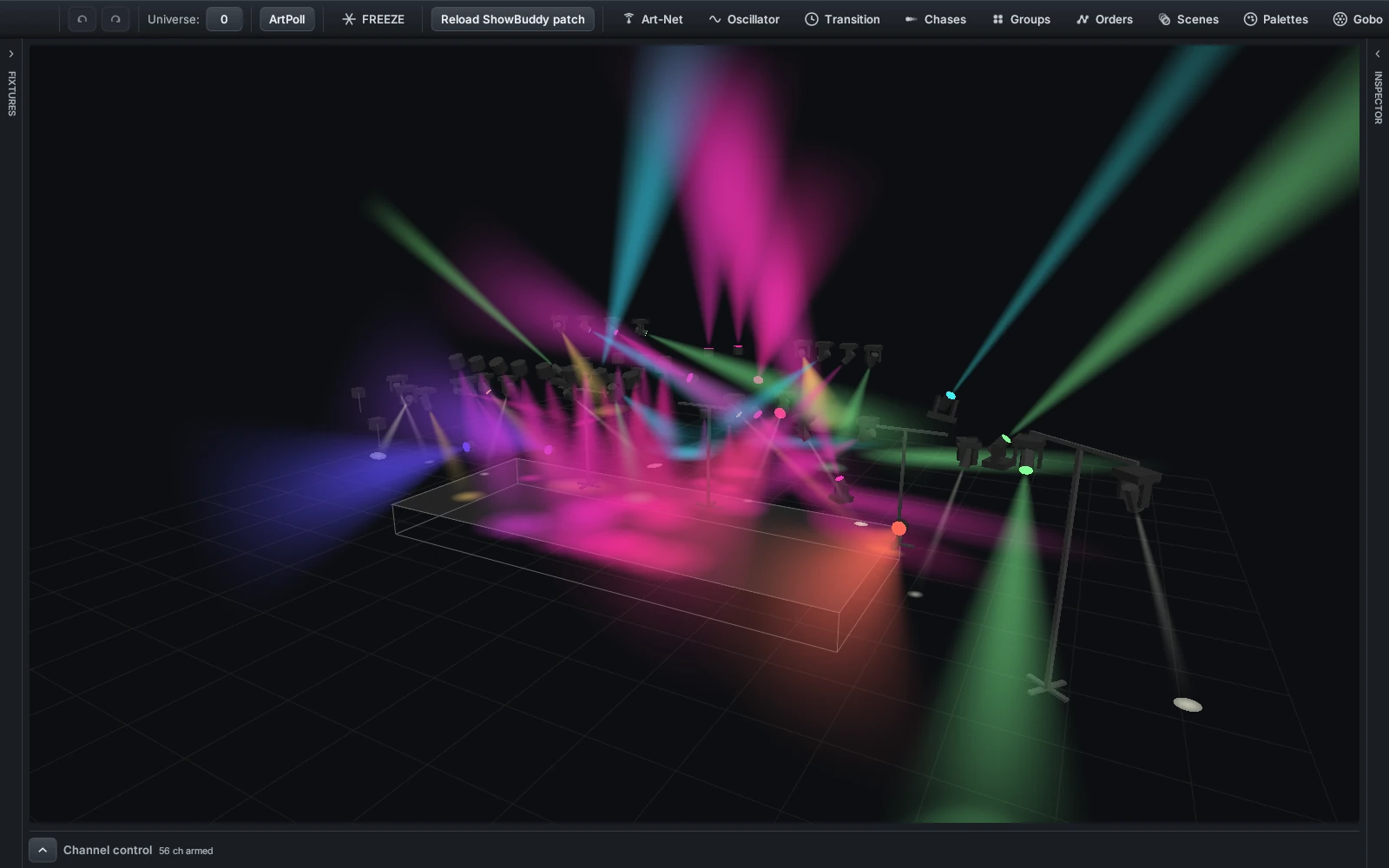
Dimmers are all this plugin touches — the colours come from whatever cue, scene or palette is already running beneath it.
Strobe Burst — a button that remembers
A one-shot white flash that decays back out. It is the pattern for every triggered effect: the press stores a timestamp, the frame hook does the arithmetic.
//! name: Strobe Burst
//! version: 1.0
//! author: DMXpress
//! description: A one-shot white flash over the whole rig that decays back out.
//! blend: add

fn controls() {
    [
        #{ kind: "label",  id: "hint",  text: "Fire a decaying white burst over the rig." },
        #{ kind: "button", id: "burst", label: "BURST" },
        #{ kind: "slider", id: "decay", label: "Decay (s)", min: 0.1, max: 2.0, value: 0.5 },
    ]
}

fn button(id, t, state) {
    if id == "burst" {
        state.fired_at = t;
    }
    state
}

fn frame(t, rig, state) {
    let out = [];
    if !("fired_at" in state) { return out; }
    let decay = state.decay;
    let age = t - state.fired_at;
    if age < 0.0 || age > decay { return out; }

    // 1 at the hit, easing out to 0.
    let k = 1.0 - age / decay;
    let v = (255.0 * k * k).to_int();
    for f in rig {
        if f.dimmer > 0 { out.push([f.dimmer, v]); }
        if f.red   > 0 { out.push([f.red,   v]); }
        if f.green > 0 { out.push([f.green, v]); }
        if f.blue  > 0 { out.push([f.blue,  v]); }
    }
    out
}button()returnsstate, sofired_atsurvives to the next frame. Drop thatstateon the last line and the button does nothing at all.frame()returns an empty array until the button has been pressed once — an empty return means the plugin contributes no layer that frame, not a black one.blend: addsums onto what is beneath and saturates at 255, which is what makes it read as a hit rather than a takeover.- Squaring
kis the whole difference between a flash and a fade. Tryk,k * kandk * k * kwith the same decay time. - Both
tvalues — the one the press was stamped with and the one the frame reads — come from the same clock, so the subtraction is safe.
Neon Night — a look with no code in it
Printed in full further up the page. Two keys, no layer, no window. Worth knowing what it actually moves:
accentrepaints selection fills, active widgets, focus strokes and link coloursurfacerepaints panel and window backgrounds, and the raised and hovered variants are derived from ittextrepaints label and widget text, with a dimmed variant derived for the quiet lines- Enable two look plugins at once and they merge key by key — later file name wins on any key both set
- Untick it and the console snaps straight back to the built-in theme
The mix
Where your layer lands.
Every frame, DMXexpress rebuilds all 1024 channels from scratch out of a fixed stack. Knowing your slot in it is the difference between an effect that works on the night and one that mysteriously does nothing.
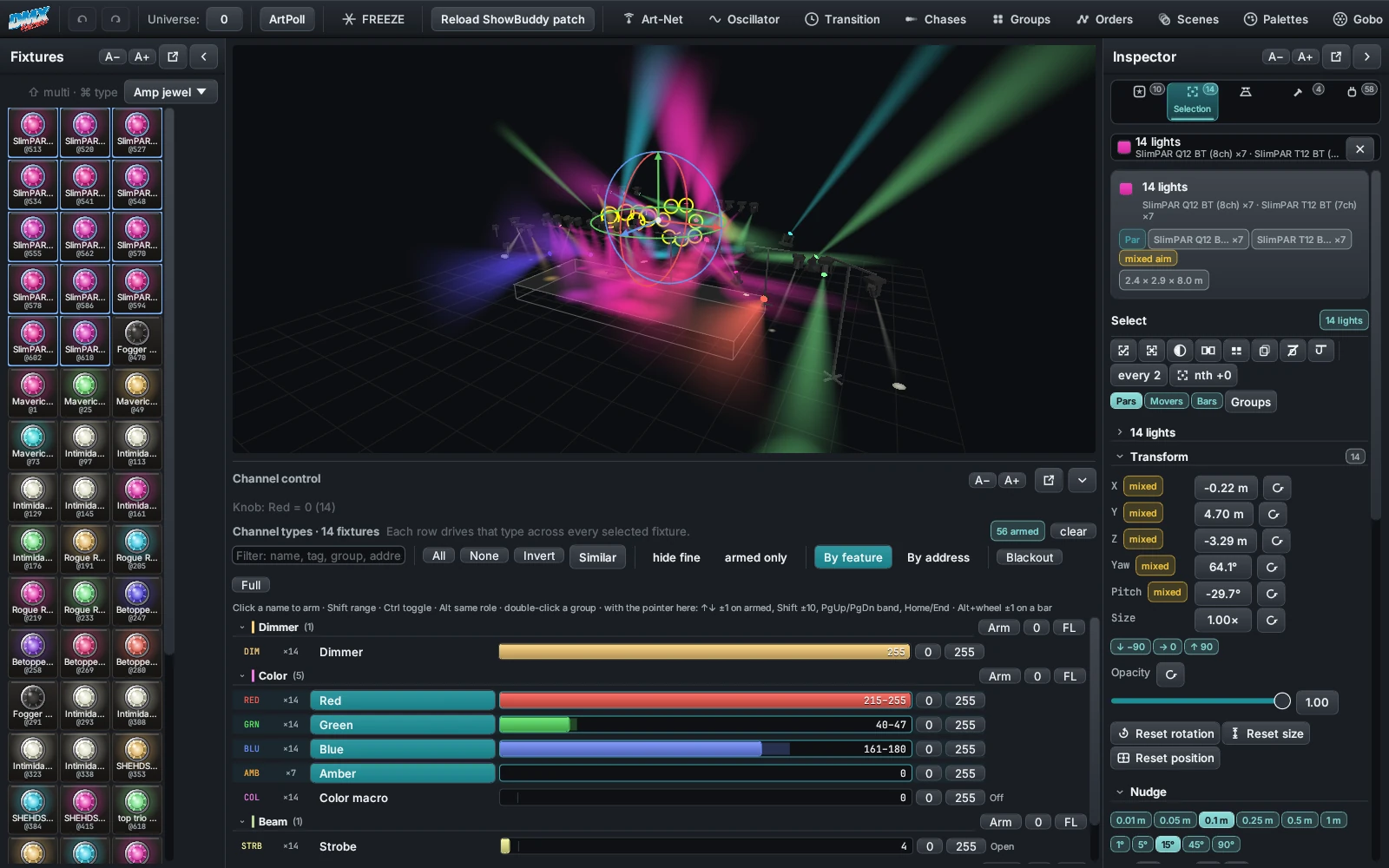
  8  Chase                 the injected look, weighted by the band
  7  Audio triggers        sound-reactive flashes
  6  Effect lanes          gobo, prism, beam wheels
  5  Palette cycle         colour stepping on the beat
  4  Programmer            what you are holding live
  3  PLUGINS               <- you are here
  2  Scenes                the scene pool
  1  Stacks                cue lists, at their fader levels
  0  Black                 the floor

     ...then the post-mix passes, in order:
     encoder, grand master, throb, dim-range, add
     phasers, hold phasers, DMX test, blackout
What that means for your script
- You sit above scenes and stacks, so you paint over recorded playback wherever you write a value
- You sit below the programmer, so anything the operator is actively holding wins on those channels
- You paint logical values. A dimmer at 255 lands at that fixture's usable maximum after dim-range compression, not in its strobe band
- The grand master, the dimmer throb, hold phasers and the DMX test window all still apply on top of you
- Several enabled plugins stack in file-name order, so
a_haze.rhaisits underb_wash.rhai - Whatever you do not write falls through untouched — return the shortest array you can
The two that surprise people
A preset recall covers everything. Recalling a preset sets the programmer's mask to all 1024 channels. Until Clear is pressed, the programmer covers every stack, scene and plugin — including channels the preset leaves at zero. If your effect vanishes the moment someone recalls a preset, that is why.
Your clock is not the show's clock. The t passed to
frame() is wall-clock seconds since the app started. It does not follow
the master BPM or the time machine, and it only pauses because Freeze stops the
frame from being rebuilt at all.
Want the beat?
Do it yourself for now: add a rate slider in cycles per minute, as Breathing Floor does, and set it to the tempo you are running.
When it breaks
Errors, and where to find them.
A bad plugin cannot crash the desk and cannot stall the frame rate. It fails in one of a small number of ways, and every one of them is printed somewhere you can see.
The file will not compile
Nothing runs. The plugin still lists with whatever its headers said, and the compiler's message — line and all — sits in red on the row.
controls() throws
The window comes up empty and no control values are seeded, so every
state lookup in your other hooks misses. Red text on the row.
theme() throws
The tint is dropped and the theme tag disappears from the row. The rest of the plugin carries on.
frame() throws, or runs out of operations
That hook is parked: it stops being called and the layer disappears, but
the plugin stays enabled. The row shows the error prefixed frame:.
Reload brings it back.
button() throws
The press is ignored and state is left alone, but the hook is not parked — the
next press tries again. The error shows on the row and inside the plugin's own
window, prefixed button:.
Nothing shows an error at all
Addresses outside 1–1024 are dropped and values are clamped into 0–255, both silently. If a channel is not moving and the row is clean, check your arithmetic and check nothing above you in the mix is covering it.
The edit loop
- Edit and save. Keep the file open in your editor. There is no build step and nothing to restart.
- Press Reload on the row. That one script recompiles from disk. Its enabled state, its open window and your slider positions all survive, as long as the control ids do.
- Read the row. Red text means it failed. A parked
framecomes back to life the moment the reload succeeds.
Reload all does the same for every file at once, and is also how a brand-new file in the folder gets picked up.
Printing your way out
print("...") is the debugger. Output appears in the Log window with
a Plugin: prefix, so open the Log before you start hunting.
- Print once, not every frame — at 40 frames a second you will drown yourself. Gate it behind a tick box.
- At most 64 lines are kept between frames; anything past that is dropped.
print(rig[0])dumps a whole fixture map, which is the fastest way to confirm what your patch actually looks like to the script.- A quick sanity check for addressing: return one pair with a known address and watch that channel in the channel grid.
Then send it out.
Once it survives a set, push the file somewhere public and submit the link above. Ideas, half-finished scripts and requests for a hook that does not exist yet all belong on the forum — the format grew out of those threads, and the four hooks are not the end of it.